This week we wanted to look at Apple’s new measurement framework designed to enhance ad attribution capabilities in iOS (from iOS 17.4 onwards) whilst still maintaining strict privacy standards. It is Apple’s latest version of a framework for measuring ad-driven app installs and user actions, based upon on the foundations and core principles of SKAdNetwork.
Apple’s original API for ad attribution and user engagement, SKAdNetwork, was usable solely within the Apple App Store – whilst now the AdAttributionKit works with both the Apple App Store and alternative app marketplaces.
Some Background
Apple’s App Tracking Transparency feature (ATT) was introduced in 2021, resulting in limited measurement effectiveness within the iOS mobile advertising ecosystem as it gave users the option to opt-out of being tracked across apps and websites for advertising purposes in iOS via a request for user permission-via through pop-up prompt-to access the Identifier for Advertisers (IDFA) to track each Apple mobile device.
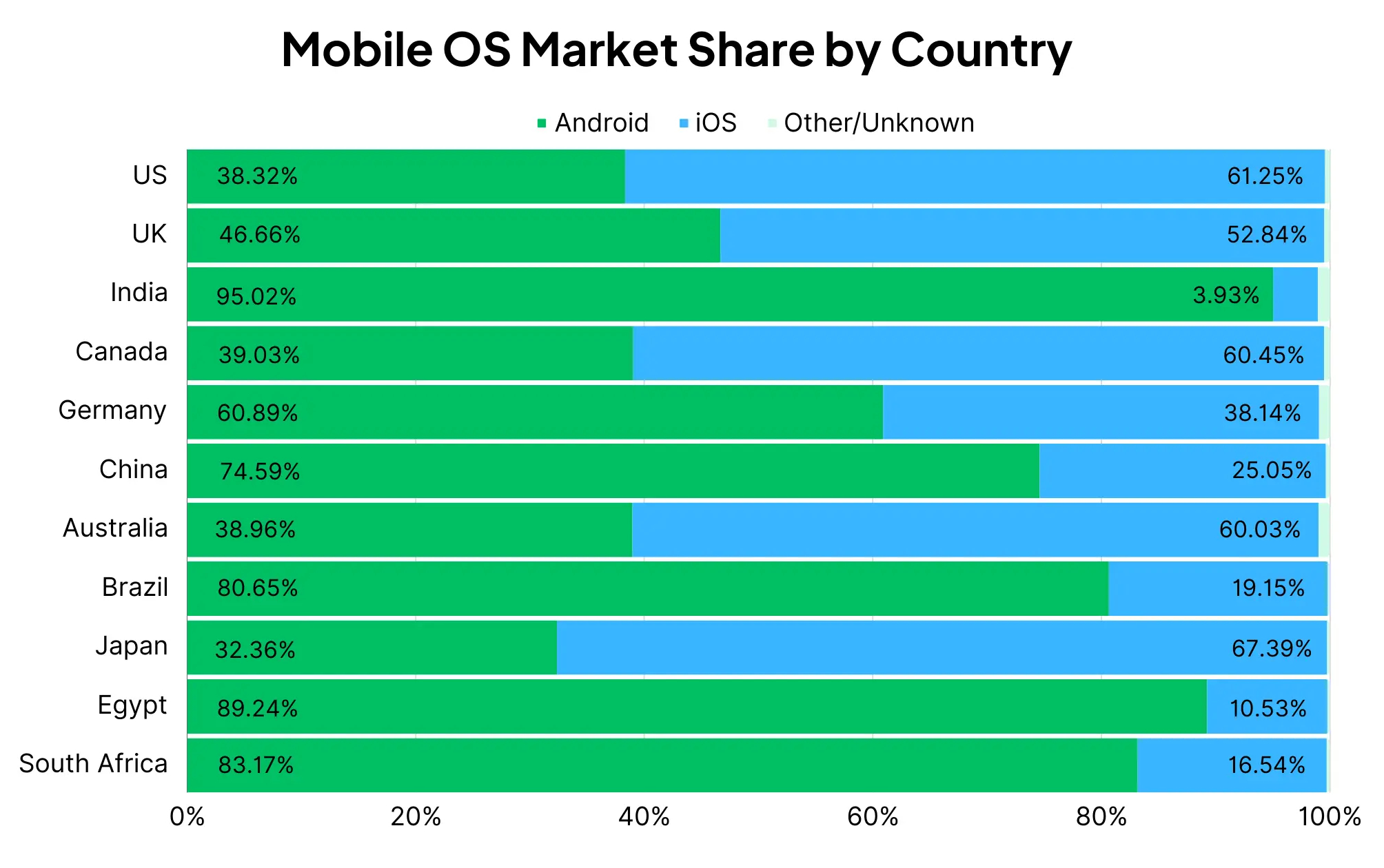
A reminder that Apple’s devices and iOS at over 60% are the most dominant player in the Australian mobile devices market (source: MobiLoud, September 2024) – as per the below:
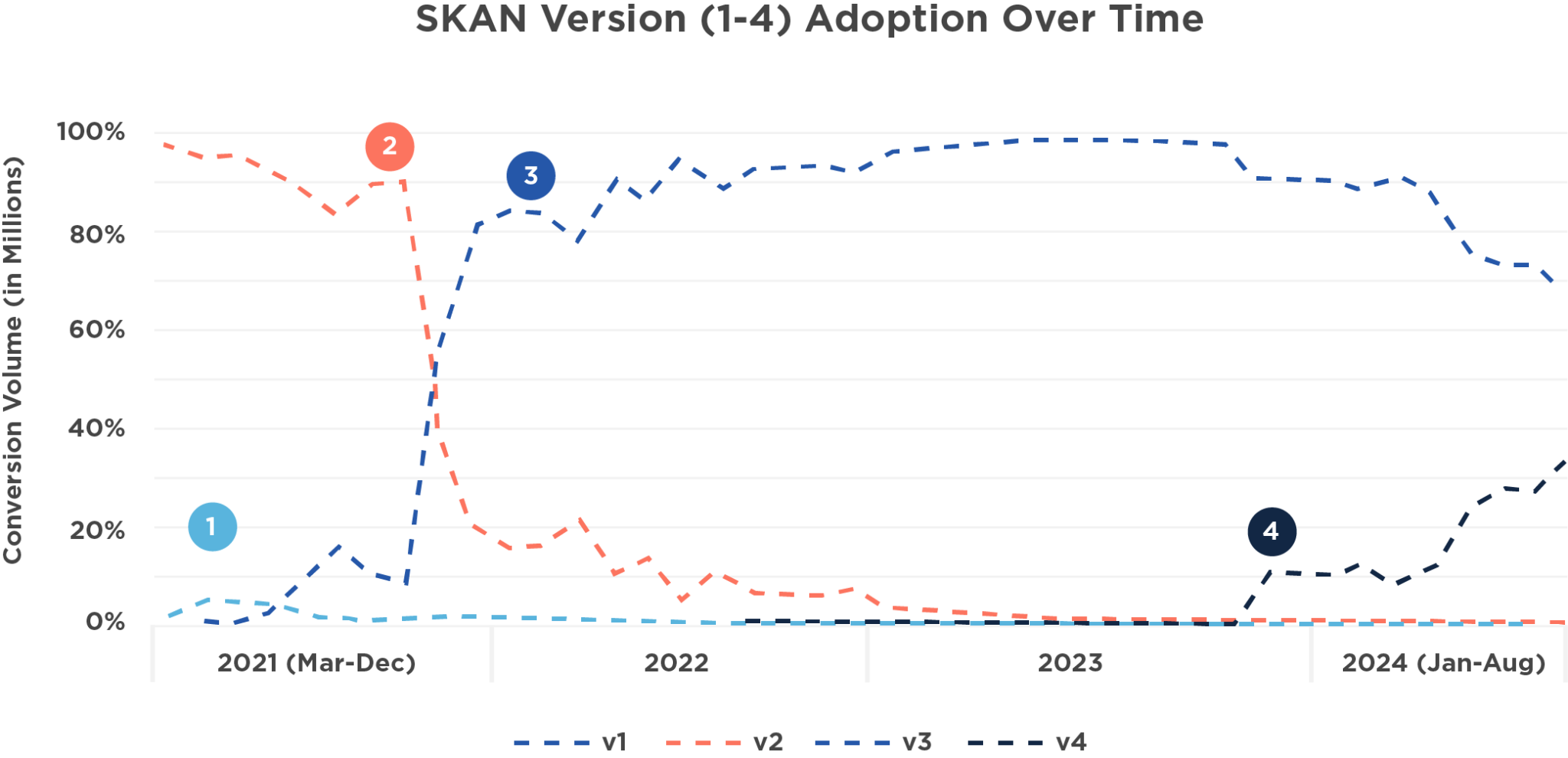
The ATT feature change resulted in a dramatic drop in leverageable signals for marketing in iOS and concurrently in order to measure ad campaigns in iOS, marketers were obliged to leverage an API called the SKAdNetwork (or SKAN) – which was Apple’s original API-based, privacy-centric framework for attribution and ad measurement. SKAN provides aggregated insights to advertisers, but with no user level data and has been through various iterations since 2021 as per the below:
Now Apple has (fairly quietly) released a major update for measurement – the AdAttributionKit (AAK) API – designed to redefine ad attribution in iOS and trying to offer better flexibility, improved insights, and a more robust privacy-first approach.
AAK builds upon SKAN’s core foundations, whilst enabling new capabilities such as re-engagement and a developer mode that makes testing much smoother for app devs.
So What’s New?
A key driver of this change from Apple is the EU’s Digital Markets Act (DMA), which requires large digital platforms like Apple to allow third-party app stores and marketplaces – so the AdAttributionKit has been designed to support alternative, third-party app stores.
There are two versions:
- App AdAttributionKit (AAAK) for app-to-app campaigns
- Web AdAttributionKit (WAAK) for web-to-app campaigns
The AdAttributionKit essentially brings several key new capabilities:
- Support for alternative app stores.
- Reengagement (retargeting) support.
- Enhanced creative support for both static images to videos and interactive ads.
- A genuinely useful Developer Mode is provided, removing time randomisation and shortening conversion windows.
- Privacy-first design supports both crowd anonymity and aggregated data.
- Improved Fraud prevention.
Support for retargeting is key, which Apple has defined as occuring when an iOS user (with an app already installed) taps a custom rendered ad or the ‘Open button’ on a StoreKit rendered ad.
As previously mentioned, the AdAttributionKit also now supports multiple advertising formats, including static images, videos, audio, and interactive ads – but can only process reengagement conversions from clicks. Hence, any measurement related to only impression-based view-throughs are not supported (whilst still tracked as views).
In terms of the different supported ad formats see below:
Custom click ads – are clickable mobile ads that take users to the App Store or a 3rd-party marketplace to download an app. Custom click ads only register clicks. As such, simply viewing this ad unit will not generate an impression.
View-through ads – track impressions on non-clickable ads (e.g., videos) but these can only register views. Crucially, tapping it does not count as an impression.
Store view ads – defined as SKOverlay and SKStoreProductViewController. The former is an overlay you can use to recommend another app or an App Clip’s corresponding full app, whilst the latter allows you to promote a product page within your app or other media that is not an app. These formats can register both clicks and views.
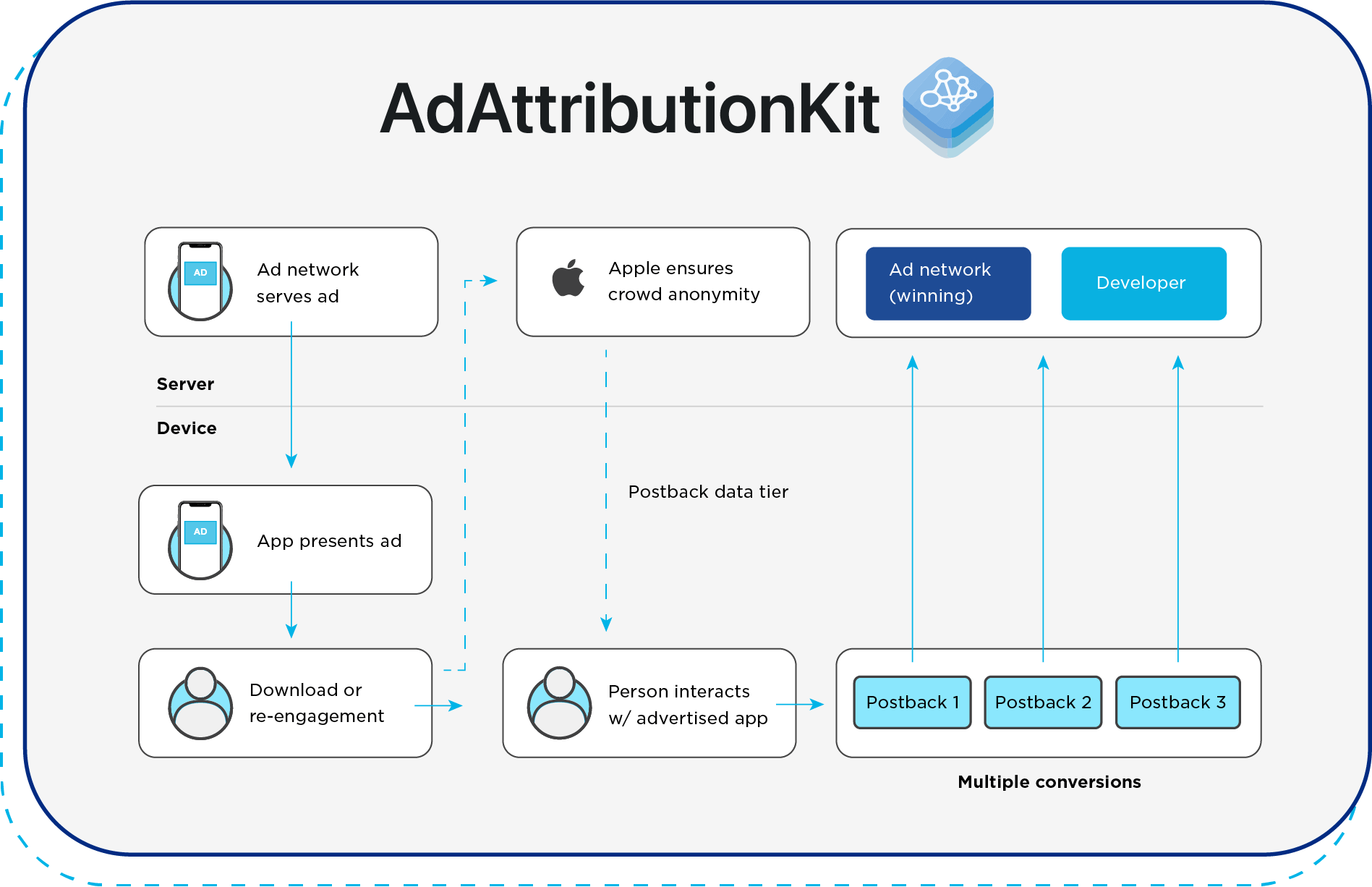
Below is a simplified illustration of the AdAttributionKit data flow:
What is Crowd Anonymity?
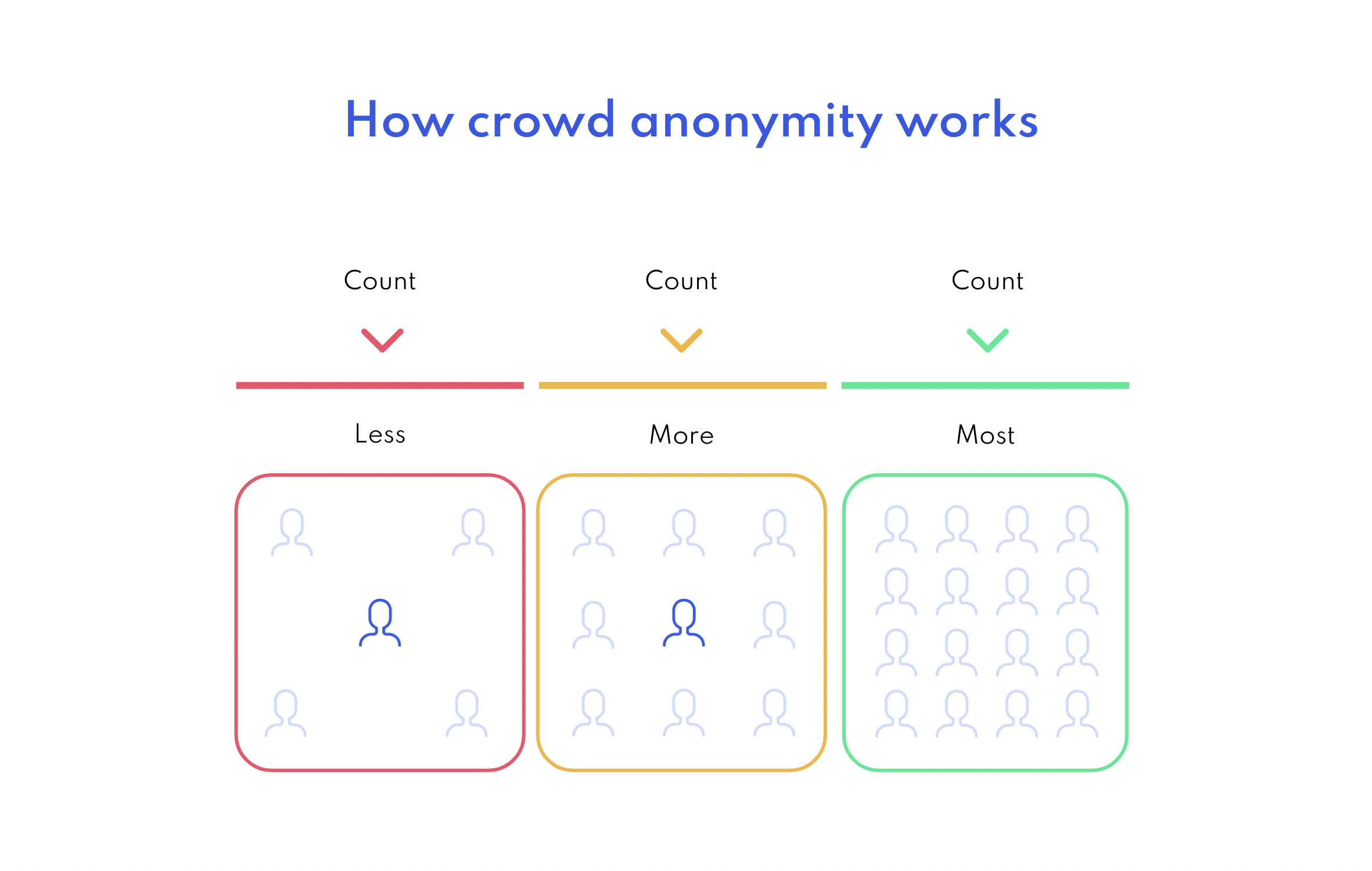
Crowd anonymity is a form of PET (Privacy Enhancing Tech) and is how Apple determines the level and type of data that will be returned via an AdAttributionKit postback. It is designed to protect individual user privacy by aggregating data within larger groups of users, making it impossible to identify single users within the datasets. The basic concept is that as the number of users or installs increases, the level of anonymity also increases, allowing for more detailed data to be shared without compromising individual privacy.
The process leverages tiers of anonymity, based upon the number of installs generated by a marketing campaign:
- Tier 0: Low install count, minimal data provided.
- Tier 1: Slightly higher install count, basic data provided.
- Tier 2: Higher anonymity, more detailed data available.
- Tier 3: Highest anonymity level, most comprehensive data shared.
As the crowd anonymity tier increases, advertisers receive more granular data about campaign performance, allowing for better optimisation of ad strategies.
The crowd anonymity tier is determined by three core factors:
- Number of installs.
- The app being installed.
- The source identifier.
Recommended Next Steps
Most of the core mobile measurement partners (MMPs) are now adding support for AdAttributionKit. Both advertisers and publishers / ad networks should adopt the new framework for it to properly function with end-to-end on ad campaigns. We generally recommend:
Update iOS software: Ensure your app supports iOS 17.4 or later.
Integrate the Framework: Add the AdAttributionKit framework to your app.
Setup for AdAttributionKit & SKAdNetwork interoperability: if an app has both AdAttributionKit and SKAdNetwork impressions, the system will sort between both of them and decide the winner.
Configure Ad Networks: Align your ad networks to work with AdAttributionKit for accurate attribution.
Set-Up Postback Endpoints: Establish endpoints to receive attribution data.
Leverage Developer Mode: Use it for rigorous testing and fine-tuning.
Opt-in for Winning Postbacks: Developers can receive copies of winning postbacks by adding the ‘AttributionCopyEndpoint’ key to their app’s Info.plist file. This enables receiving the same postback data that ad networks receive for winning attributions, providing valuable insights into your app’s performance.
IAB Tech Lab SKAdNetwork ID list tool & OpenRTB extensions
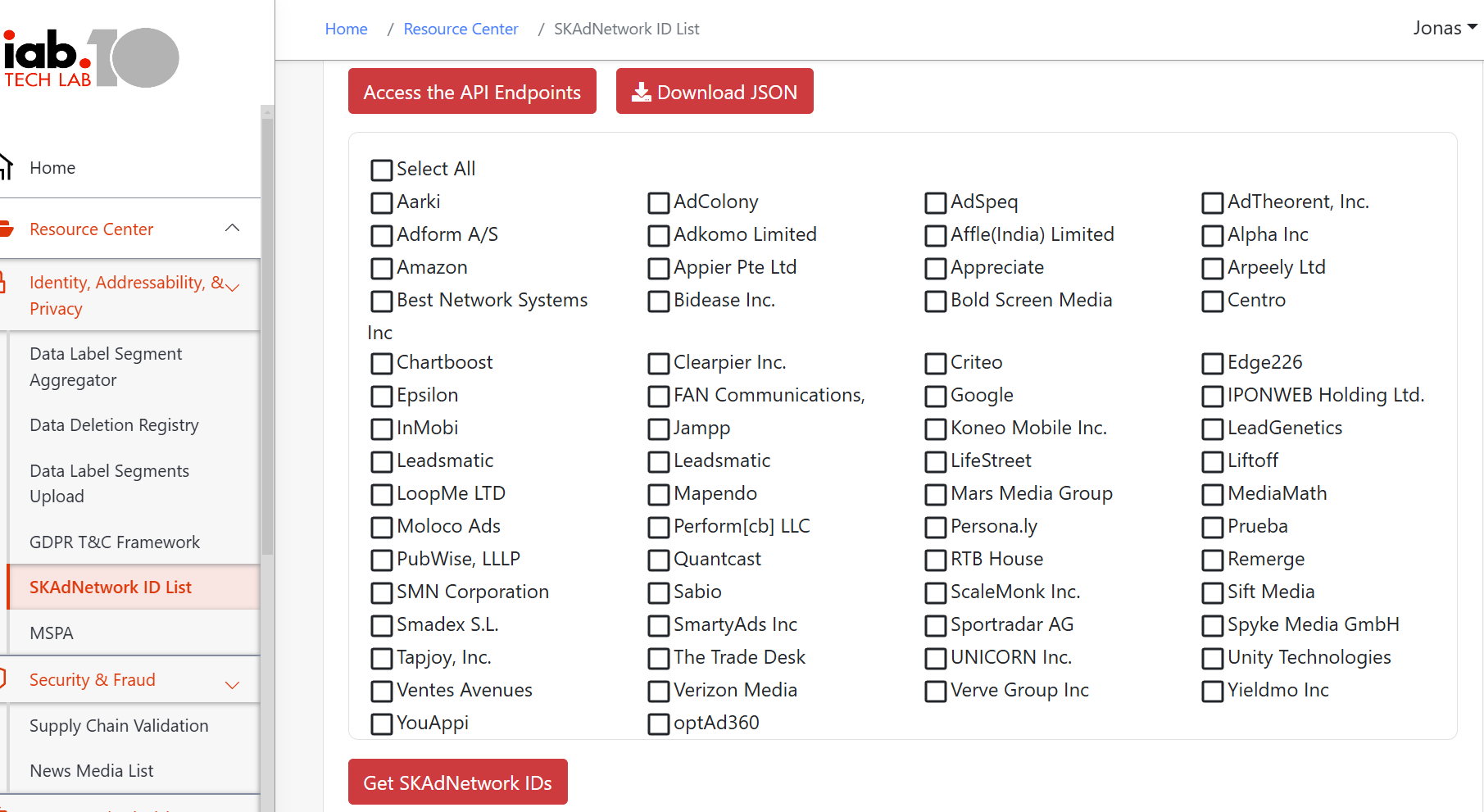
The IAB Tech Lab has for some time now been running a tool for managing and maintaining your SKAdNetwork ID list. Advertisers, DSPs, and networks can register their SKAdNetwork IDs and the tool will publish a list of all registered IDs that can be downloaded by app developers and publishers.
The IAB Tech Lab has also introduced technical specifications aimed at adapting Apple’s SKAdNetwork, for programmatic ad buying.
The following are the updates are provided via a dedicated GitHub repository – CLICK HERE
- SKAdNetwork extension to support programmatic buying.
- Bid Request extension (BidRequest.imp.ext.skadn).
- Bid Response extension (BidResponse.seatbid.bid.ext.skadn).
- A Device extension (BidRequest.device.ext) to support IDFV and authorization status.
- IAB Tech Lab managed SKAdNetwork list.
- Guidance for app developers to help manage their Info.plists and work with various SDKs.